
Last Updated on June 16, 2026 by Babusona Mondal
The official UP Panchayat Voter List 2026 for the Amethi district features the fully revised electoral rolls of rural citizens eligible to vote in the upcoming local body elections. Users can quickly perform a block-wise or gram panchayat-level search to verify or download their final voter status.
Electoral District Overview
Are you looking for the updated UP Panchayat Final Voter List 2026 specifically for the Amethi district? If yes, you have landed on the right page. The State Election Commission of Uttar Pradesh (SEC UP) has uploaded the revised booth-wise voter rolls for all rural and local body areas in Amethi.
Whether you belong to any region under this Amethi district, checking your name in the official UP Gram Ganchayat Voter List 2026 is now fully digital. In this article, we provide the direct download links and a comprehensive guide to checking your voter status across all development blocks in Amethi district.
List of Blocks in Amethi for Panchayat Voter List Download
To download the UP Panchayat Chunav Voter List 2026 for your specific area, you must first know your development block. Amethi district is divided into the following blocks.
How to Download the UP Amethi Panchayat Final Voter List 2026
Downloading the roster for any Gram Panchayat under Amethi District is straightforward. Follow these quick steps:
Step 1: Open the Official SEC UP Portal
Launch your preferred web browser on your mobile phone or computer and type the official URL of the State Election Commission of Uttar Pradesh: sec.up.nic.in. Let the homepage load fully so all navigation menus and interactive portal banners become visible on your screen.
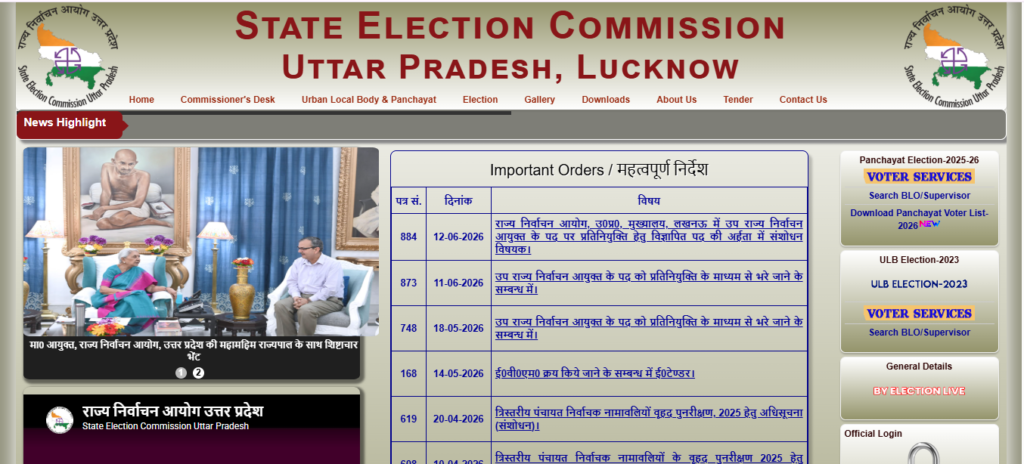
Step 2: Navigate to the Download Voter List Link
Look closely at the homepage menu bar or the active sidebar banners. Locate the “Panchayat Election” tab or directly click on the prominent option labeled “Download Panchayat Voter List” (अन्तिम मतदाता सूची डाउनलोड करें) to open the dedicated electoral search dashboard.
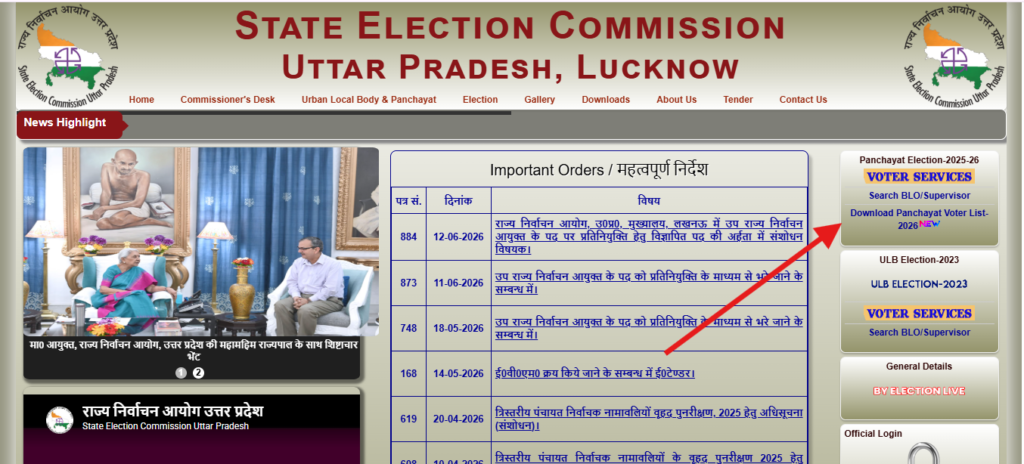
Step 3: Select Amethi District (जनपद):
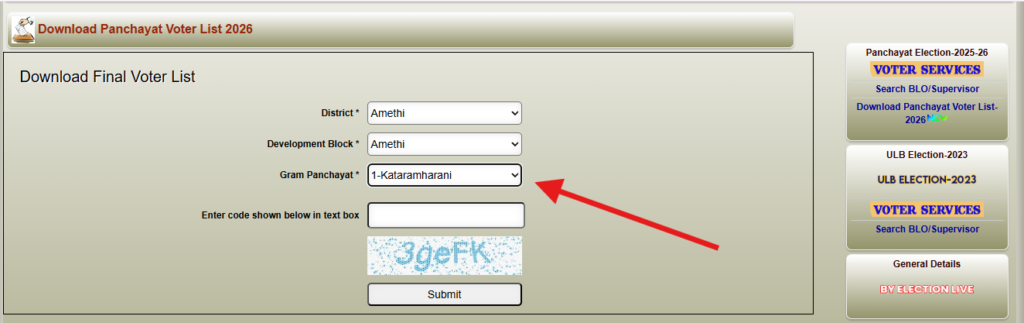
On the newly opened form, you will see a series of cascading dropdown menus. First, click on the “District” (जनपद) dropdown list and choose the Amethi district of Uttar Pradesh where your village or home town is situated.
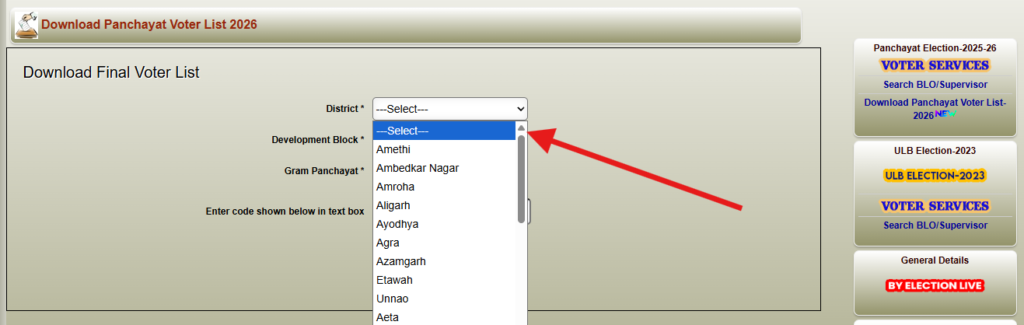
Step 4: Choose Your Development Block (विकास खण्ड):
You Amethi district is selected, the page will automatically refresh the sub-options. Now, click on the “Development Block” (विकास खण्ड) dropdown menu and accurately select the administrative block that governs your rural area
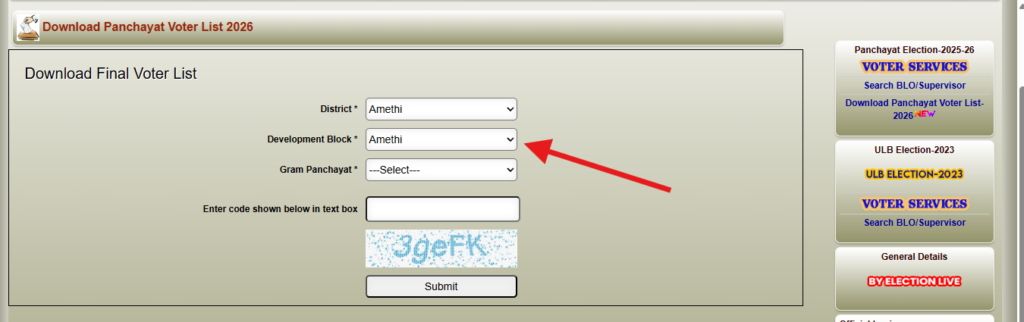
Step 5: Select Your Gram Panchayat (ग्राम पंचायत)
After specifying your development block, click on the third dropdown menu labeled “Gram Panchayat” (ग्राम पंचायत). Scroll through the official list that appears, locate your specific Gram Panchayat name, and click on it to select it.
Step 6: Enter the Security Captcha Code and Submit:
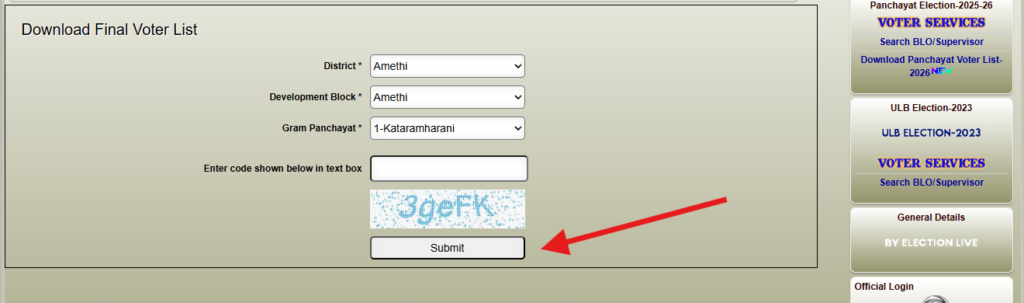
Directly below the selection menus, a unique, case-sensitive alphanumeric security code will be displayed. Carefully type this exact code into the text box provided next to it, double-check it for errors, and click the “Submit” button.
Step 7: Click on Final Voter List Download Button
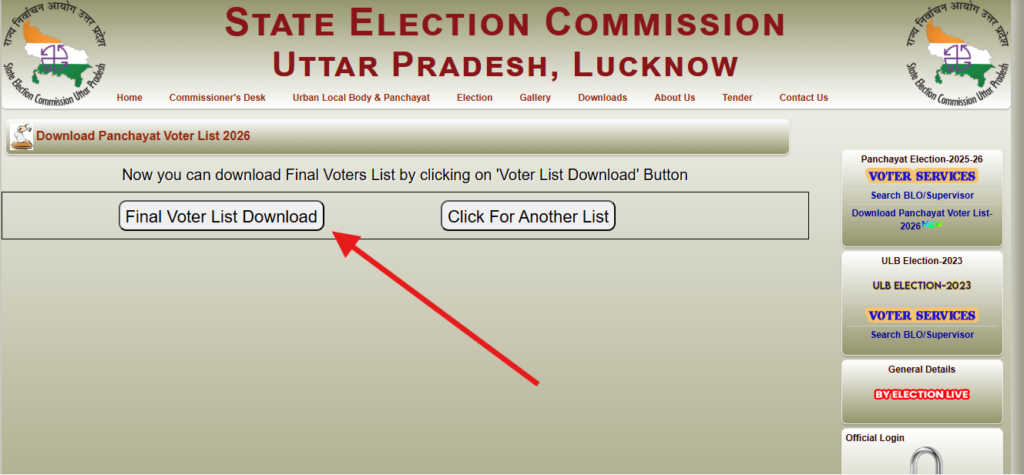
A new page will open up on your screen. Simply click the “Final Voter List Download” button to instantly save the official PDF to your device. If you need to search for another area, you can click on “Click For Another List” right beside it.
How to Search for Your Name Inside the Downloaded PDF
Once the download is complete, navigating through hundreds of names in your local area can be tricky. Use these 5 sequential steps to find your name easily:
Step 1: Open the Document with a PDF Viewer
Locate the downloaded UP Panchayat Final Voter List 2026 file on your device. Open it using a reliable application like Adobe Acrobat Reader, Google Drive PDF Viewer, or directly inside your internet browser (Chrome/Edge) to ensure all text is searchable.
Step 2: Trigger the Search or ‘Find’ Function
Open the search bar within the PDF reader. If you are using a laptop or desktop computer, simply press the keyboard shortcut Ctrl + F (Windows) or Cmd + F (Mac). On a smartphone, tap the menu button (usually three dots or a magnifying glass icon) and select “Find in page” or “Search“.
Step 3: Input the State Voter Number (SVN) or Name
Carefully type the details you want to trace. For the UP Panchayat Chunav 2026 Voter List files, it is highly recommended to search by your unique Voter ID/SVN Number first, as it completely bypasses any potential spelling mistakes made during the manual registration and entry process.
Step 4: Use Alternative Spelling Combinations
If searching by your full name yields no results, try searching with just your first name or last name. Because these official UP Panchayat Voter List documents contain regional Hindi-to-English translations, names can sometimes have slight phonetic variations, so trying a few different spellings can help.
Step 5: Cross-Verify Personal and Family Details
Once you locate a matching name, carefully cross-check the surrounding columns to seal the verification. Look closely at the House Number, Age, and the Father’s or Husband’s Name listed in that row to confirm you have found your exact active profile in the current database.
Alternative Method: Search Your Name via Voter ID (EPIC/SVN Number)
If downloading an entire village PDF seems time-consuming and you only want to verify your individual status, you can utilize the online database search engine:
- Go to the “Search Panchayat Voters” section on the official SEC UP portal.
- Filter your location by choosing your District, Block, and Gram Panchayat.
- Enter your first name, surname, and your father’s or husband’s name in the search boxes.
- Alternatively, you can input your voter identity card number (EPIC / State Voter Number) for faster results.
- If your registration is active, your complete booth profile will appear. From there, you can directly print out your digital Voter Slip (Voter Parchi) to bring to the polling booth.
What to Do If Your Name is Missing or Contains Errors?
If you review the newly published up panchayat final voter list and discover that your name is missing, misspelled, or has an incorrect age/address, you can submit an application for corrections. The State Election Commission provides seamless online and offline remediation channels:
- Form-2 (Addition): Use this form if you are 18 years or older and need to add your name to the local village database for the first time.
- Form-3 (Modification): Use this form if your name, age, relation, or house number is printed incorrectly and needs typographical correction.
- Form-4 (Deletion): Use this form to remove names of individuals who have permanently migrated or passed away.
These structural forms can be processed digitally via the SEC UP Citizen Service Portal or handed over physically to your regional BLO (Booth Level Officer) during designated revision camp days.
Conclusion
Securing your name on the localized UP Panchayat Final Voter List is your passport to voting in the Amethi local elections. Ensure you and your family members check your voter slips ahead of election day to avoid last-minute issues at your local polling booth.