
Last Updated on August 8, 2026 by Babusona Mondal
The State Election Commission (SEC) and the Chief Electoral Officer (CEO), Karnataka have released the Karnataka SIR Deleted Voter List 2026 and the ASDDO List under the Special Intensive Revision (SIR) program. If you are a resident of Karnataka or want to ensure your name remains active on the electoral roll, checking this list is crucial.
According to official updates, over 1.10 crore voters have been placed in the ASDDO category, accounting for nearly 20% (one-fifth) of the total electoral roll in the state. Read through this detailed guide to check if your name was inadvertently marked for deletion, learn how to download the district-wise PDF online, and find out how to restore your voter status.
Karnataka SIR Voter List 2026: Quick Key Highlights
| Parameter | Details & Information |
| Official Website | ceo.karnataka.gov.in |
| Revision Type | Special Intensive Revision (SIR) 2026 |
| Total Voters in ASDDO List | Over 1.10 Crore (Statewide) |
| Percentage of Total Electoral Roll | Approximately 20% |
| Pending Enumeration Forms | Over 2.41 Lakh forms awaiting digitization |
| Bengaluru Voter Exclusion Rate | Nearly 50% (~49.42 lakh voters) |
What is the ASDDO List and Why Are Names Being Removed?
The term ASDDO stands for five specific voter classification categories used by election officials:
- A – Absent
- S – Shifted
- D – Duplicate
- D – Dead
- O – Others
Data from the Chief Electoral Officer (CEO) Karnataka reveals that over 60% of the forms digitized daily end up in the ASDDO category. With more than 2.41 lakh enumeration forms still needing to be digitized, thousands of genuine voters have ended up on this list due to clerical updates or relocation mismatches.
How to Download Karnataka ASDDO List 2026 PDF from Official Portal
Follow these step-by-step instructions to download SIR Karnataka Voter List the official district-wise PDF from the state portal:
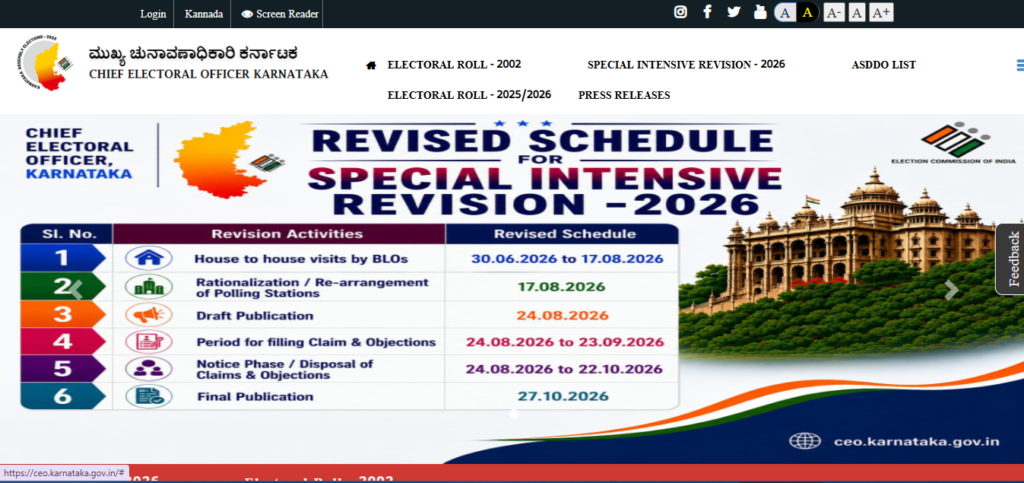
Step 1: Visit the SEC Official Website
Open your web browser and navigate to the official Karnataka Election Commission portal at ceo.karnataka.gov.in. Ensure the homepage loads fully so you can clearly see the navigation bar and primary portal options.
Step 2: Locate the ASDDO Link
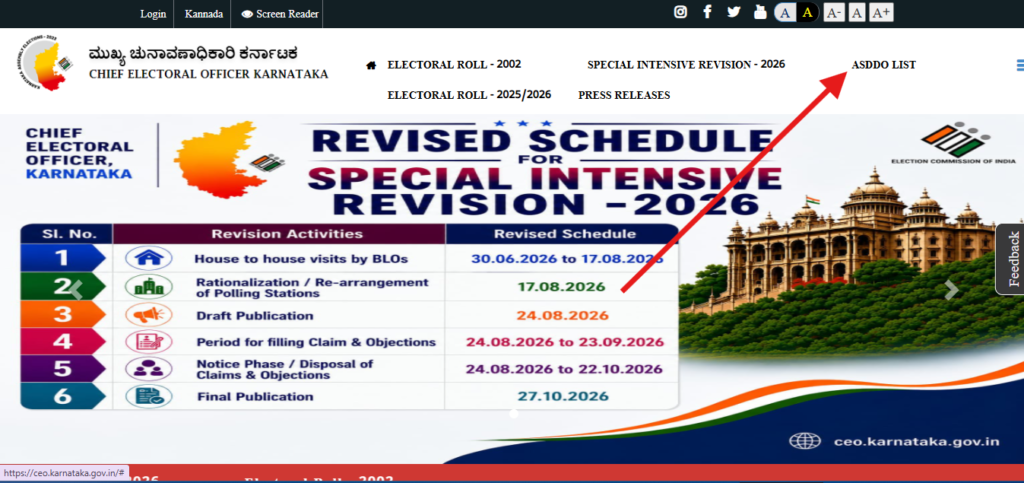
On the main homepage, look for the link titled “ASDDO List” or “Special Intensive Revision (SIR) – ASDDO List“. Click on this option to open the district-wise selection directory.
Step 3: Select District & Constituency
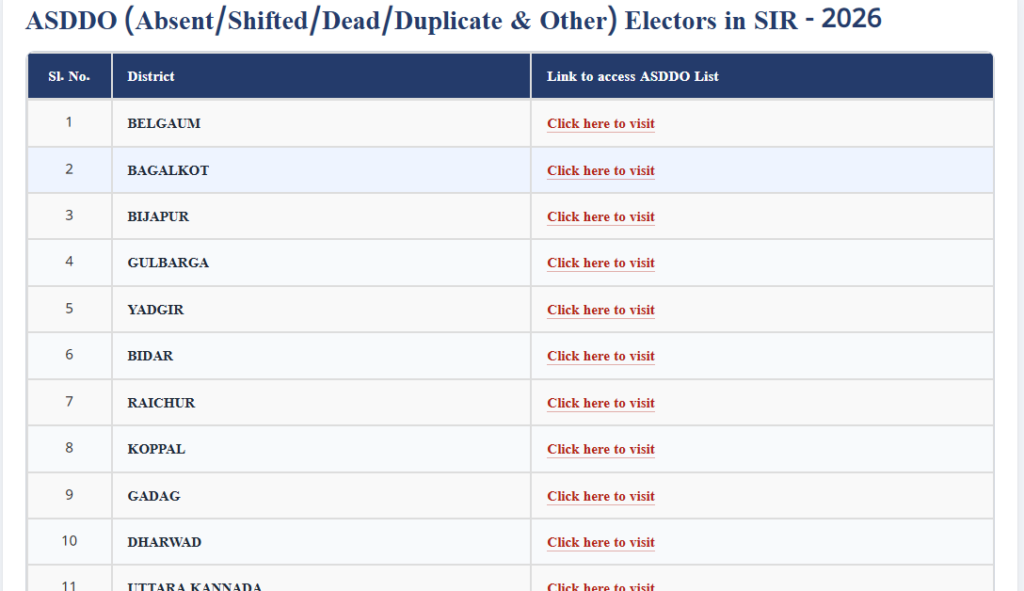
On the redirection page, choose your District from the available menu, and then select your specific Assembly Constituency to display the list of corresponding polling stations.
Step 4: Download PDF
Scroll down to find your local polling station name and number, then click the “Download PDF” button next to it to save the deleted voter list directly to your device.
District Wise ASDDO (Absent/Shifted/Dead/Duplicate & Other) Electors in SIR – 2026
How to Check Your Removed Name Status
- Search in the PDF: Open the downloaded PDF file and use the shortcut (
Ctrl + Fon computers or the search icon on mobile) to search for your EPIC Number (Voter ID Number) or name. - Online Portal Verification: Visit the “Search Your Name in Electoral Roll” section on
ceo.karnataka.gov.inand query your EPIC number directly to view real-time status. - Understand Your Status: If your name appears on the ASDDO list, your status will explicitly show as “Shifted”, “Absent”, or another corresponding tag.
What To Do If Your Name Is Included in the List?
If you still reside at your registered address but your name appears in the ASDDO list, you can submit a correction to restore your name to the main electoral roll.
- Contact Your Booth Level Officer (BLO): Reach out immediately to your designated BLO and present proof of residence.
- Submit Enumeration Verification: The BLO will verify your physical presence and update your entry in the system.
- Fill Form 6 & Self-Declaration: If required, submit Form 6 along with the prescribed self-declaration form and identity documents for fresh inclusion in the voter list.
List of 11 Officially Accepted Identity Documents
During verification or re-inclusion, you can submit any one of the following valid identity proofs:
- Indian Passport
- Aadhaar Card
- PAN Card
- Driving License
- MGNREGA Job Card
- Passbook with photograph issued by a Bank or Post Office
- Health Insurance Smart Card issued under the Ministry of Labour scheme
- Pension document with photograph
- Official identity card issued to MPs/MLAs/MLCs
- Service ID Card issued by Central/State Govt/PSUs
The official portal managed by the Chief Electoral Officer of Karnataka is ceo.karnataka.gov.in.
No. Inclusion in the ASDDO list means your name is marked for deletion in the draft roll. Submitting Form 6 with proof of address to your BLO allows you to reinstate your name on the final electoral roll.
You can find your assigned BLO’s contact details by entering your EPIC number into the voter search page on ceo.karnataka.gov.in or through the Voters Service Portal.