
Last Updated on September 25, 2026 by Babusona Mondal
The historical Bihar Bhojpur Voter List 2003 Voter List contains the definitive baseline data of all qualified citizens registered during the intensive state revision framework. Users can efficiently perform a district-wise or block-level roll inspection to locate legacy family proofs.
Electoral District Overview
If you are looking for the historical Bihar SIR List 2003 database specifically for the Bhojpur region, you are in the right place. During the crucial SIR (Special Intensive Revision) drive, the CEO Bihar Voter List 2003 was published to streamline records for all citizens in this area. Tracking down the official Voter List PDF 2003 Bihar for your particular booth or block is essential if you need to produce solid legacy proof for land registration, old family legal cases, or ancestry verifications.
In this guide, we have mapped out the absolute easiest way to access the Bihar 2003 Voter List for Bhojpur district along with its complete sub-division and assembly constituency breakdown.
Bhojpur District AC-Wise 2003 Voter List PDF Download
To make things easy for you, we have listed all the assembly constituencies (AC) across the Bhojpur district right below. Every constituency listed in the grid is linked to its dedicated page. All you need to do is find your specific AC from the list and click on it—it will take you straight to our detailed post where you can view and download the official 2003 voter list PDF instantly.
Why the 2003 SIR Voter List for Bhojpur Matters Today
The Voter List Bihar 2003 PDF for Bhojpur District, published during the Special Intensive Revision following the state's historical administrative restructuring, makes the Bhojpur 2003 Voter List PDF an invaluable legal reference today for verifying family legacy data and tracking old booth boundaries.
- It documents the first wave of verified residents within Bhojpur under the newly independent Bihar state framework.
- It is highly demanded by local land revenue departments and circle offices for verifying old property mutations.
- It clears up any confusion regarding old missing names in the standard Bihar Voter List 2003 records.
Bhojpur Voter List 2003 PDF Download – Step-by-Step Guide
If you are looking for the Bhojpur Voter List 2003, you can search the old Bihar electoral roll through the official Chief Electoral Officer (CEO), Bihar website. The Bihar election portal provides a dedicated “Search your name in 2003 Bihar e-Roll” service under the Special Intensive Revision – 2025 section.
Using this service, voters can search the 2003 electoral roll by entering details such as district, Assembly Constituency, Part Number, name, relative's name, age, gender, or EPIC number. The portal also provides a Search By Details and Search By Serial In Part option.
Below is a step-by-step guide to help you check the Bhojpur Voter List 2003 online.
Step 1: Visit the Official CEO Bihar Website
First, visit the official Chief Electoral Officer (CEO), Bihar website:
ceoelection.bihar.gov.in/ The website provides various election-related services, including voter information and electoral roll services.
On the homepage, look for the “Special Intensive Revision – 2025” section. Under this section, you will find the option “Search your name in 2003 Bihar e-Roll.” Click on this option to continue.
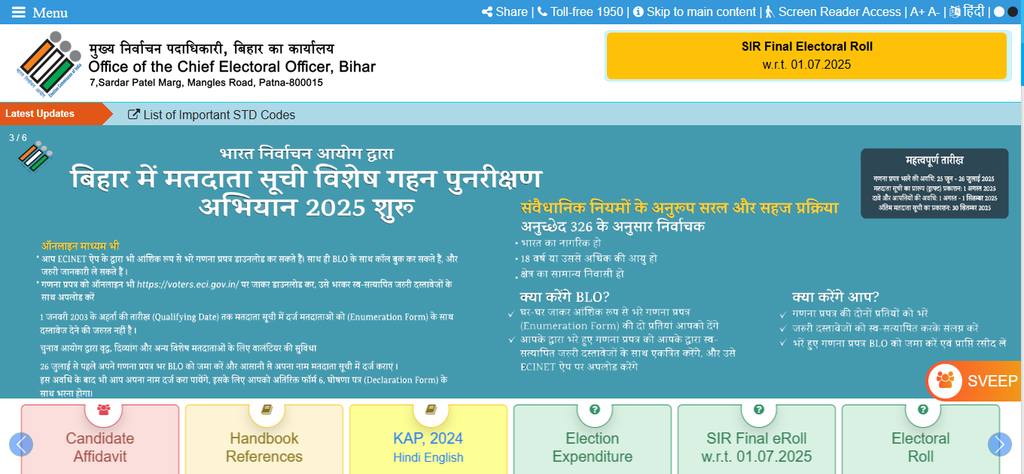
CEO Bihar official website showing the Special Intensive Revision – 2025 section and the 2003 Bihar e-Roll search option.
Step 2: Click on “Search your name in 2003 Bihar e-Roll”
After finding the Special Intensive Revision – 2025 section, click on “Search your name in 2003 Bihar e-Roll.”
The link opens the dedicated Bihar 2003 electoral roll search page: election.bihar.gov.in/electorsearch2003/ A new page will open with two different search options:
- Search By Details
- Search By Serial In Part
You can select either option according to the information you have.
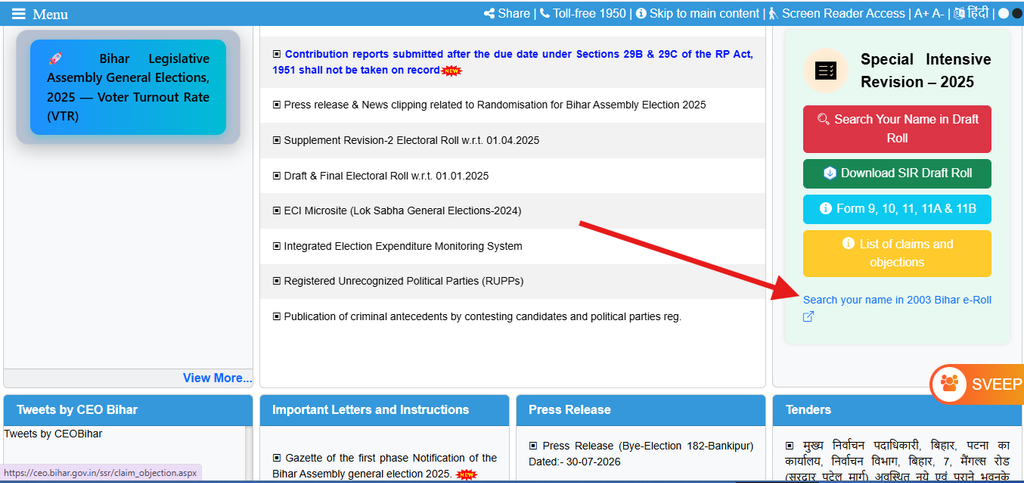
Bihar 2003 e-Roll search page showing the Search By Details and Search By Serial In Part options.
Step 3: Select “Search By Details”
If you want to search for a voter's name using personal information, select “Search By Details.”
This option allows you to enter information such as the voter's district, Assembly Constituency, Part Number, name, relative's name, age, gender, and EPIC number.
For this guide, we are searching for the Bhojpur Voter List 2003, so select Search By Details.
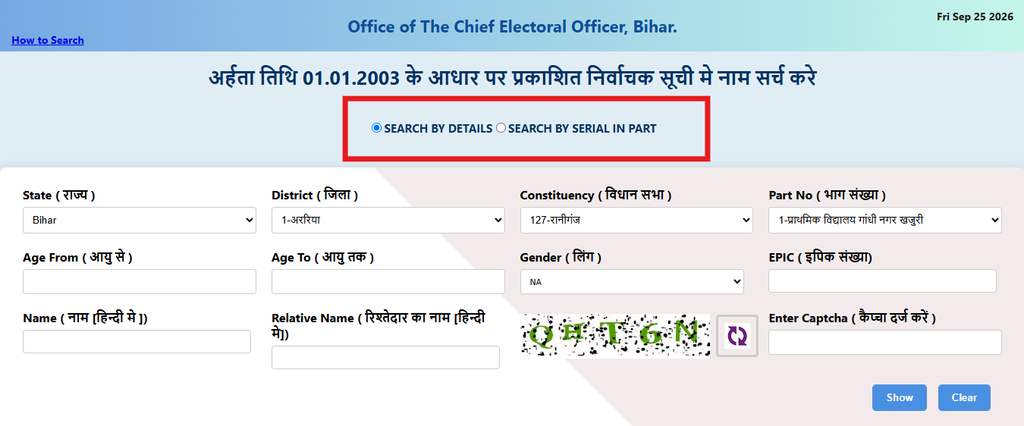
Search By Details option on the Bihar 2003 voter search page.
Step 4: Select State and Bhojpur District
After selecting Search By Details, you will see several fields. The State (राज्य) field is already set to: Bihar Next, open the District (जिला) dropdown menu. Select:
7- भोजपुर (Bhojpur)
Make sure that you select the correct district before moving to the next field.
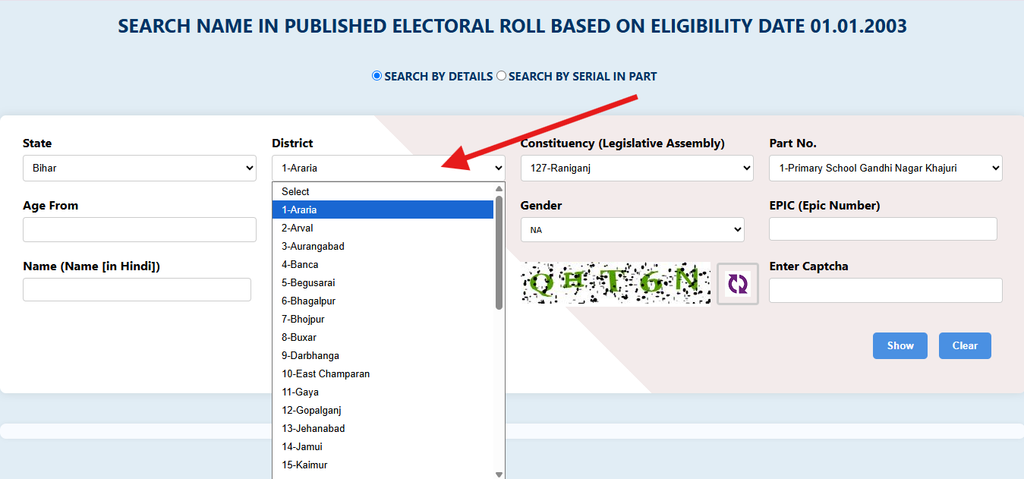
District dropdown showing Bhojpur selected for the Bihar 2003 electoral roll search.
Step 5: Select the Assembly Constituency
After selecting Bhojpur district, the Constituency (विधान सभा) field will show the Assembly Constituencies available for that district.
For Bhojpur district, the available Constituency options include:
Select the Assembly Constituency where the voter was registered in the 2003 Bihar electoral roll.
If you know the old Assembly Constituency, select it from the dropdown list.
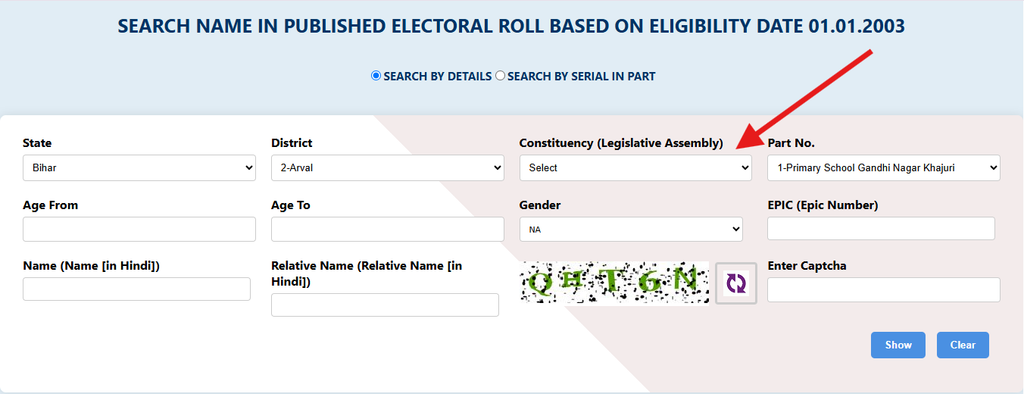
Assembly Constituency dropdown showing the available Bhojpur district constituencies.
Step 6: Select the Part Number
After selecting the Assembly Constituency, the Part No (भाग संख्या) field will become available. The Part Number represents a particular polling station or electoral roll part. Select the required Part Number from the dropdown list.
For example, depending on the selected constituency, the list may contain polling locations such as schools, community buildings, panchayat buildings, and other polling stations.
If you already know the voter's old Part Number, selecting it can make the search easier.
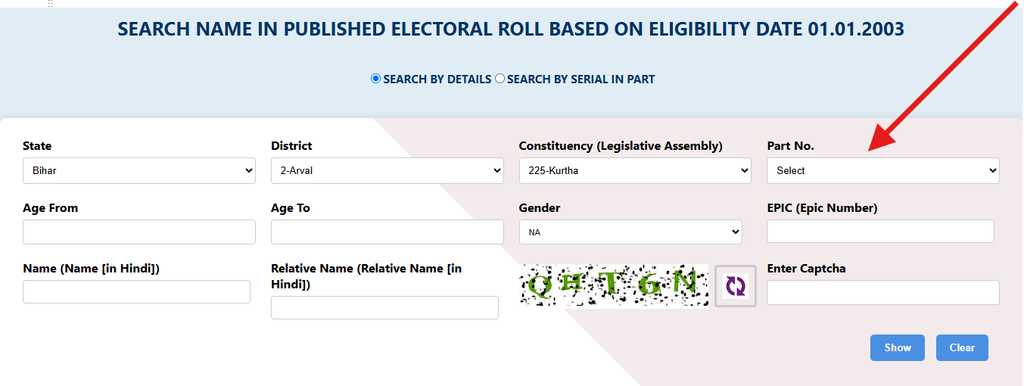
Part Number dropdown showing polling station details for the selected Assembly Constituency.
Step 7: Enter Voter Details
The Search By Details option provides several fields that can be used to narrow the search. Depending on the information available to you, you may enter:
- Age From
- Age To
- Gender
- EPIC Number
- Name (नाम [हिन्दी में])
- Relative Name (रिश्तेदार का नाम [हिन्दी में])
You do not necessarily need to fill every field. Enter the information you know and keep the remaining fields blank if they are not required.
For example, you can search using the voter's name and relative's name along with the district and Assembly Constituency.
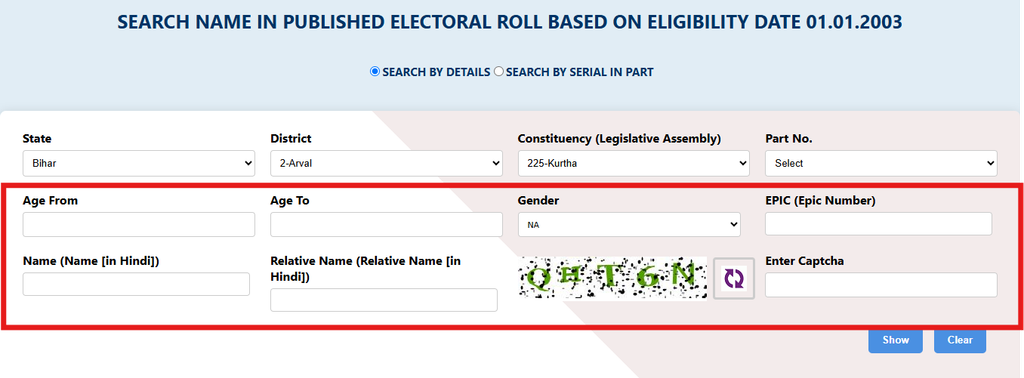
Bihar 2003 voter search form showing the voter details fields.
Step 8: Enter CAPTCHA
Before submitting the search, you will see a CAPTCHA image on the page.
Carefully read the characters displayed in the CAPTCHA image and enter them in the “Enter Captcha (कैप्चा दर्ज करें)” field.
The CAPTCHA is used to verify that the search request is being submitted through the website.
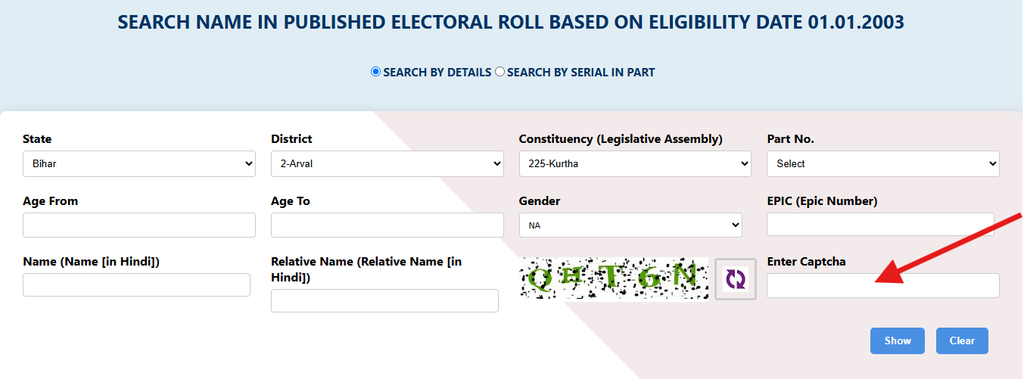
CAPTCHA verification field on the Bihar 2003 electoral roll search page.
Step 9: Search the Bhojpur Voter List 2003
After entering the required information and CAPTCHA, submit the search form. The website will process your information and display the available voter records matching the search criteria.
Check the results carefully and look for the required voter's name, relative's name, Part Number, serial information, and other available electoral details.
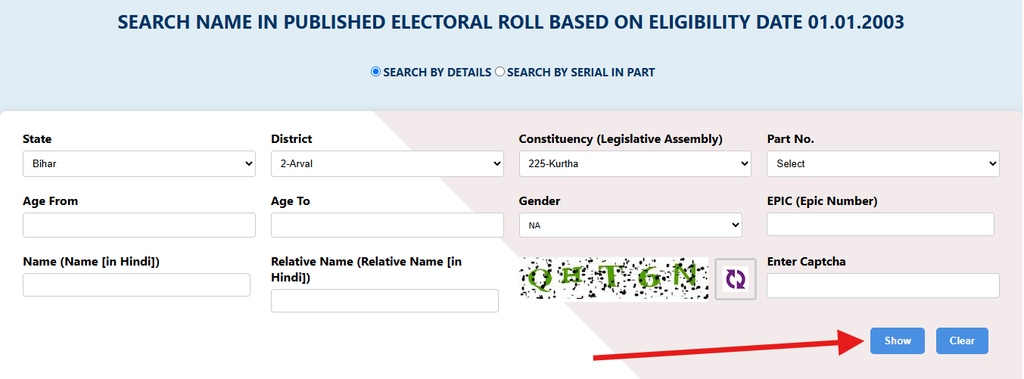
Search results displaying voter information from the 2003 Bihar electoral roll.
Step 10: Search by Serial in Part
The Bihar 2003 e-Roll portal also provides another option called “Search By Serial In Part.”
This option can be useful when you already know the voter's Part Number and Serial Number from the old electoral roll.
Select Search By Serial In Part and provide the required information.
You will generally need to select:
- State (राज्य): Bihar
- District (जिला): Bhojpur
- Constituency (विधान सभा)
- Part No (भाग संख्या)
- Serial in Part (भाग संख्या में क्रमांक)
After entering the required information, enter the CAPTCHA and submit the form.
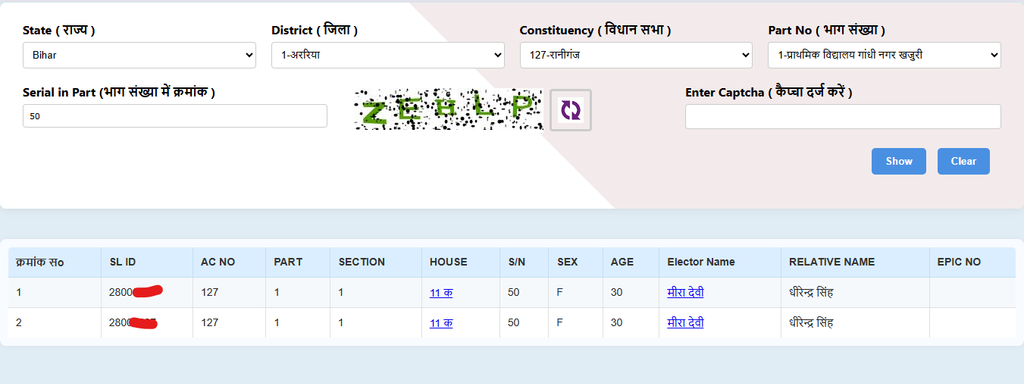
Search By Serial In Part option for checking a voter record in the 2003 Bihar electoral roll.
Step 11: Check Your 2003 Voter Details
After submitting the search, the website will show the available details for the selected voter. Check the information carefully to make sure that the record belongs to the correct person. You can compare the available details with old documents or family records if necessary.
The information displayed by the portal is based on the 2003 Bihar electoral roll available through the official election website.
Important Note: Due to continuous server upgrades, very old digital files like the Voter List PDF 2003 Bihar databases are sometimes moved to offline government archives. If a specific PDF is unavailable online, you can easily obtain a certified physical copy by submitting an application at your local District Election Office or Block Office.
How to Search for Your Name Inside the Downloaded PDF
Once the download is complete, navigating through hundreds of legacy records can be tricky. Use these 6 sequential steps to find your name easily:
Step 1: Open the Document with a PDF Viewer
Locate the downloaded Voter List PDF 2003 Bihar file on your device. Open it using a reliable application like Adobe Acrobat Reader, Google Drive PDF Viewer, or directly inside your internet browser (Chrome/Edge) to ensure all text is searchable.
Step 2: Trigger the Search or 'Find' Function
Open the search bar within the PDF reader. If you are using a laptop or desktop computer, simply press the keyboard shortcut Ctrl + F (Windows) or Cmd + F (Mac). On a smartphone, tap the menu button (usually three dots or a magnifying glass icon) and select "Find in page" or "Search".
Step 3: Input the EPIC (Voter ID) Number or Name
Carefully type the details you want to trace. For the Bihar SIR List 2003 files, it is highly recommended to search by your unique EPIC (Voter ID) Number first, as it completely bypasses any potential spelling mistakes made during the manual digitization process back in 2003.
Step 4: Use Alternative Spelling Combinations
If searching by full name yields no results, try searching with just the first name or the last name. Because these historical Bihar 2003 Voter List documents were compiled during early statehood, names were often translated phonetically, which means trying a few variations of the English spelling can help.
Step 5: Cross-Verify Personal and Family Details
Once you locate a matching name, carefully cross-check the surrounding columns to seal the verification. Look closely at the House Number, Age (as recorded in 2003), and the Father's or Husband's Name listed in that row to confirm you have found the exact entry from the Archived Voter List Bihar 2003 database.
Summary
Acquiring the old Voter List 2003 Bihar records for Bhojpur does not have to be an exhausting process. By utilizing the official Voter List Bihar 2003 SIR data, you can easily secure your family's historical identity proofs.
If you are facing any errors or missing links while searching for a specific booth within Bhojpur, drop a comment below and our team will guide you!